About the author

TL;DR: Most developers use AI coding tools, and only about 3% highly trust the output, which makes careful review more valuable than ever. Here’s what’s changed:
• The work moved from writing to reviewing. Your dev team writes less code by hand and spends more time verifying it. Checking takes longer and calls for real skill, so it pays to have people who do it well.
• “Almost right” is the tricky part. Code that’s 90% correct can pass review and surface later, in front of your customers. A thoughtful review process catches it first.
• Prompting AI is real work. Someone has to tell the AI what your site is, what it’s for, and which decisions are already settled.
• You’re partnering for judgment. In theory, anyone can generate code using AI, but knowing whether it belongs on your site takes real experience.
AI adoption in web development is climbing, but trust is still catching up
Developers are embracing AI coding tools while staying thoughtful about them. Stack Overflow’s 2025 survey found 84% of developers use or plan to use AI tools, up from 76% a year earlier. At the same time, more developers distrust its accuracy (46%) than trust it (33%), and only about 3% say they highly trust it.
AI is shifting web development work from writing code to reviewing it
Developers used to write the code, run it, and fix it. Now, they may specify what they want, hand it to the AI, check the result, and take responsibility for it.
The time saved on typing shows up elsewhere: writing a clear prompt, guiding the AI, and verifying the result. Sometimes that’s a real time gain. Other times, what would have been twenty minutes of coding becomes forty minutes of understanding what the AI did.
Reviewing is a different skill from writing, and often a harder one. When you write something, you understand the project and know why every piece is there. When you review, you’re reconstructing someone else’s reasoning at a pace AI sets. It’s a bit like inheriting a site somebody else built, a dozen times a day.
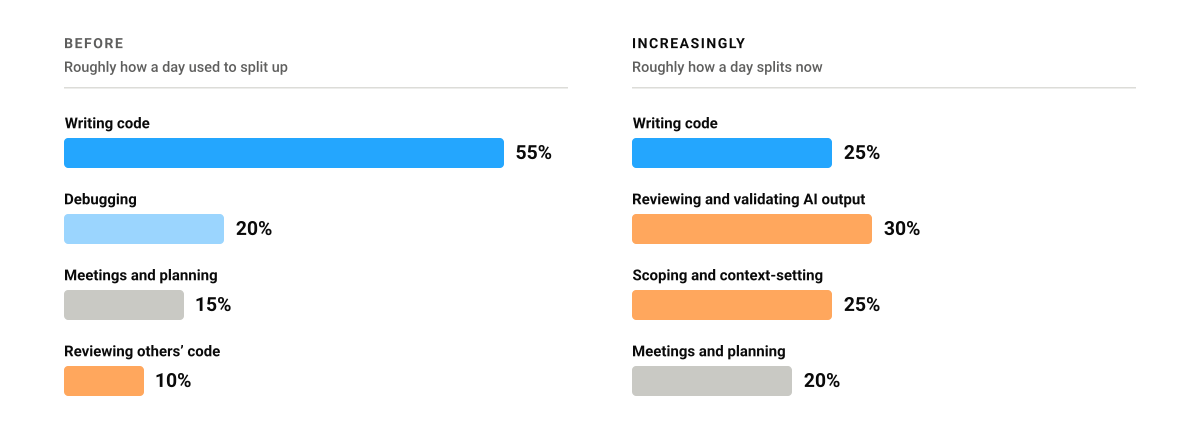
The chart above was shared by Bo English-Wiczling, PayPal’s Vice President of Global Developer Relations, at WordCamp US 2026. Both columns use the same scale. Writing code drops from 55% of the day to 25%, while reviewing and directing work someone else wrote climbs from 10% to 55%. Debugging folds into that review time, which is where most of the day now goes.
The “almost right” problem
Two-thirds of developers in the Stack Overflow survey named AI output that’s almost right, but not quite, as their biggest frustration. Nearly half (45%) said debugging AI-generated code takes more time. That’s a big reason AI hasn’t shortened project timelines as much as early marketing suggested it would.
Wrong code is easy to spot because it fails loudly, so you fix it and move on. Almost-right, AI-generated code is the kind to watch: it runs, and it can sail through review.
Here’s what that can look like on a real site: A developer asks the AI to build a related articles section. The way it’s built quietly breaks the headline on the block below it, which now displays the wrong article’s title. No error appears, so it goes unnoticed until a customer spots it. This is exactly what a careful development process is designed to catch.
AI-generated code is only as good as the context and direction it receives
AI does its best work with good context: what your site is for, which decisions are settled, and why odd bits of code exist. Preparing that context is where much of the time AI saves gets reinvested. It’s also worth thinking about what goes into AI in the first place. Credentials and customer data should likely never be part of a prompt.
AI can build code that works, but humans still decide what belongs on the website
AI has gotten very good at what works. “Belongs here” is where people add the most value, because it depends on decisions and context AI doesn’t have.
Here are three places it shows up in real projects:
- It works, but it can lock people out. A dropdown or accordion built the quick way opens and closes as expected. It’s also invisible to screen readers and unreadable to AI search engines, which read via the same underlying structure assistive technology does. So one shortcut can create both an accessibility gap and a visibility gap. AI doesn’t read a page the way a person does; it pulls structured data points and synthesizes them.
- You can get more than you asked for. You wanted a testimonials section. You got one, plus three supporting systems you didn’t request. Together they can slow the site down and conflict with the rest of your build.
- It matches your brand today, and may not tomorrow. A color hardcoded in one place instead of pulled from your defined brand palette works right now. It gets complicated the first time you rebrand or adjust a shade, when someone has to hunt down every hardcoded instance.
None of these show up in a demo, which makes them great things to ask your dev team about.
What’s safe to hand off to AI
Two questions help decide:
- How easy is this to verify?
- How much damage does it do if it’s wrong?
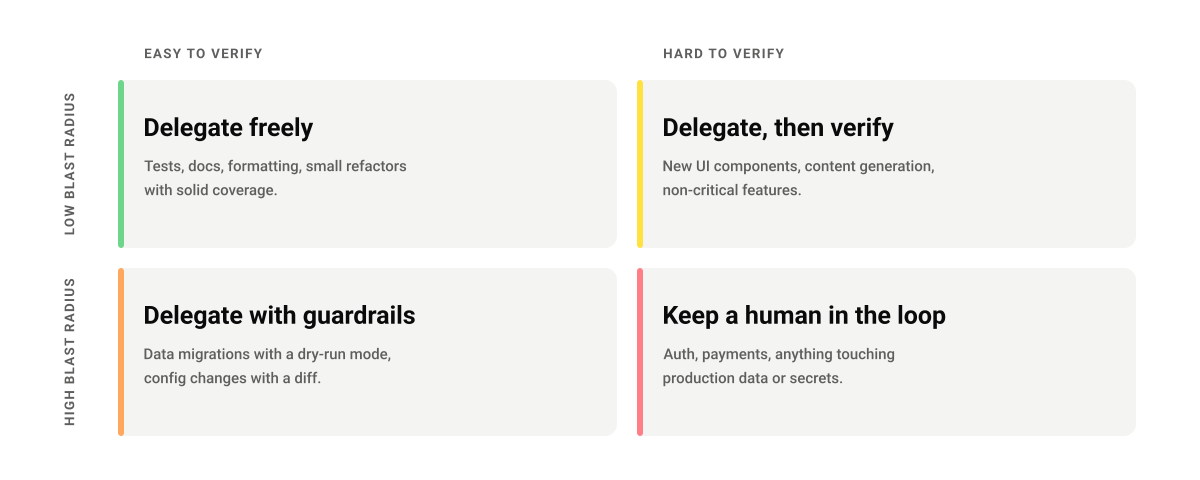
That framework comes from the same WordCamp US session. Tests, documentation, formatting, and small cleanups are easy to check and cheap to get wrong, so they’re good candidates to hand off freely. Logins, payments, and anything touching live customer data are harder to check and costly to get wrong, so a person stays in the loop.
Ask your development team or vendor which box a given piece of work falls into. If everything gets the same level of review, that’s worth a conversation.
Questions to ask your web development team about AI-generated code
You don’t need to fully understand code to evaluate the process. These questions open good conversations with any development team or vendor:
- How do you verify AI-generated work before it ships? “We test it” doesn’t tell you much. “We identify the edge case most likely to break it, then test for that specifically” tells you a lot.
- Do you run separate review passes? A reviewer hunting for one class of problem (accessibility, security, brand consistency) finds more than a reviewer looking at everything at once.
- Who owns it when it breaks? The answer to look for is a named person.
- What happens to our design system? Consistent standards are what AI tends to drift away from when nobody’s reinforcing them.
The bottom line: AI can accelerate web development, but human judgement still matters
AI has moved the work of building a website out of typing and into judgment, so projects start faster and take real care to finish well. The good news is that this care is something the right partner brings. When you’re evaluating one, look for a development team that can spot something that runs perfectly and still doesn’t belong on your site, and that will tell you openly when they see it.
Building a website with AI? Make sure the right expertise is behind it.
Envisionit’s web development team combines AI-powered efficiency with the human judgment needed to build websites that perform, scale, and work for your audience.